hasta ahora los hosts se pueden comunicar con otros hosts dentro de la misma VLAN ahora que pasa cuando un host en una VLAN necesita comunicarse con un host en una VLAN diferente?
inter-VLAN usa un dispositivo de capa3 como un router o un switch de capa 3
operacion de routeo inter-VLAN
hay tres opciones de routeo inter-vlan:
- routeo legcay inter-vlan: es una solucion legacy, no escala bien
- router-on-a-stick: es una solucion aceptable para redes pequenas a medianas
- switch capa 3 usando switched virtual interfaces (SVIs): es la solucion mas escalable para medianas y largas empresas
legacy inter-vlan routing
se apoyaba en usar un router con multiples interfaces ethernet.
cada router estaba conectado a un puerto switch en diferentes VLANs.
las interfaces del router servian como los default gateways para los localhosts en la subnet VLAN
por ejemplo:
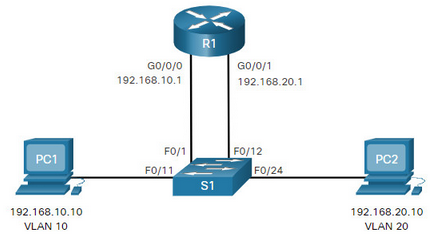
- Fa0/1 port is assigned to VLAN 10 and is connected to the R1 G0/0/0 interface.
- Fa0/11 port is assigned to VLAN 10 and is connected to PC1.
- Fa0/12 port is assigned to VLAN 20 and is connected to the R1 G0/0/1 interface.
- Fa0/11 port is assigned to VLAN 20 and is connected to PC2. esta solucion no es razonablemente escalable, porque los routers tienen un numero limitado de interfaces fisicas. al requerir una interface del router por VLAN, rapidamente agosta las interfaces fisicas de capacidad de un router
este metodo no se usa actualmente
router-on-a-stick inter-VLAN routing
este metodo solo requiere una interfaz ethernet fisica para routear trafico entre multiples VLANs en la red
una interfaz de un router con cisco ios esta configurada como 802.1Q trunk y conectada a un trunk port en un switch de capa 2. las interfaces del router estan configuradas usando subinterfaces para identificar VLANs routeables
las subinterfaces configuradas estan basadas en software (son virtuales). cada una esociada con una interfaz ethernet singular.
las subinterfaces son configuradas en software en un router. cada una de ellas es independientemente configurada con una direccion IP y una asignacion VLAN. las subinterafces son configuradas para diferentes subnets que corresponden a su asignacion VLAN
cuando trafico taggeado como VLAN entra al router, es reenviado a la subinterfaz VLAN luego de hacer una decision de ruteo, si la interfaz de salida esta configurada como una subinterfaz 802.1Q, los data frames salen taggeados como VLAN con el nuevo VLAN y enviados de nuevo a la interfaz fisica
resumen: basicamente usa una unica interfaz fisica en un router para routear trafico entre multiples VLANs
configuracion router-on-a-stick
! En el router
interface GigabitEthernet0/0/0
 no shutdown

interface GigabitEthernet0/0/0.10
 encapsulation dot1Q 10
 ip address 192.168.10.1 255.255.255.0

interface GigabitEthernet0/0/0.20
 encapsulation dot1Q 20
 ip address 192.168.20.1 255.255.255.0

interface GigabitEthernet0/0/0.99
 encapsulation dot1Q 99 native
 ip address 192.168.99.1 255.255.255.0
! En el switch (puerto trunk hacia router)
interface GigabitEthernet1/0/1
switchport trunk encapsulation dot1q
switchport mode trunk
switchport trunk native vlan 99
switchport trunk allowed vlan 10,20,99flujo de paquetes router-on-a-stick
- PC1 (VLAN 10) envia frame a su gateway (router subinterface .10)
- Switch taggea frame con VLAN 10 y lo envia por trunk al router
- Router recibe frame en subinterface .10, remueve tag 802.1Q
- Router hace decision de routing (destino en VLAN 20)
- Router encapsula paquete en nuevo frame con tag VLAN 20
- Router envia frame por subinterface .20 hacia switch
- Switch recibe frame taggeado VLAN 20, lo forward a PC2
consideraciones clave router-on-a-stick
- Native VLAN: debe coincidir en router y switch (ej. VLAN 99)
- Ancho de banda: todo trafico inter-VLAN pasa por un solo link fisico (cuello de botella)
- Punto unico de falla: si el router o link falla, no hay inter-VLAN routing
- CPU del router: procesamiento por software (mas lento que hardware switching)
verificacion router-on-a-stick
show ip interface brief
show interfaces trunk
show vlans
show ip route
show interfaces GigabitEthernet0/0/0.10
ruteo inter-VLAN en un switch de capa 3
el metodo moderno es usar switches de capa 3 y switched virtual interface (SVI)
SVI: es una interfaz virtual conectada a switch de capa 3
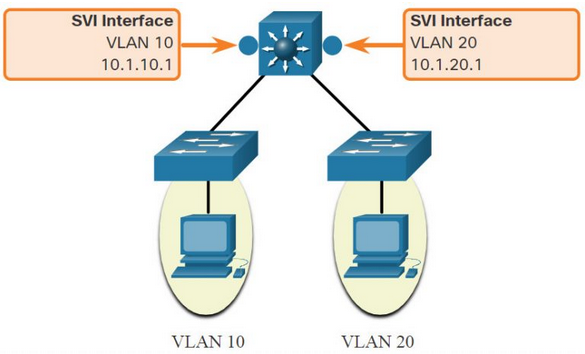 nota: a los switch’s de capa 3 tambien se les llama multilayer switch, porque opera en capa 2 y 3
las SVIs para inter-VLAN son creadas de la misma forma que una inteface management VLAN es configurada. el SVI es creado para una VLAN que existe en el switch. a pesar de ser virtual, el SVI puede hacer las mismas funciones para la VLAN, de la misma forma que una interface de router podria hacer
ventajas de usar switches de capa 3 para inter-VLAN routing:
- mucho mas rapidos que router-on-a-stick porque todo esta switcheado y routeado con hardware
- no hay necesidad de links externos desde el switch al router para routear
- no estan limitados a un unico link porque los etherchannels de capa 2 pueden ser usados como trunk links entre los switches para mejorar ancho de banda
- ether channel agrupa varios puertos fisicos de switches en un unico link etherchannel logico e incrementa el ancho de banca y provee redundancia
- latencia mucho menor porque los datos no necesitan salid del switch para ser routeados a una red distinta
- mas comunmente deployados en campus LAN que en routers la desventaja es que los switches de capa 3 son mas caros
configuracion SVI en switch capa 3
! Habilitar routing IP (requerido en algunos switches)
ip routing

! Crear SVI para VLAN 10
interface vlan 10
 ip address 192.168.10.1 255.255.255.0
 no shutdown

! Crear SVI para VLAN 20
interface vlan 20
 ip address 192.168.20.1 255.255.255.0
 no shutdown

! Verificar VLANs existen en base de datos VLAN
vlan 10
 name USERS
vlan 20
 name SERVERS
routed ports (puertos enrutados) vs SVIs
! Puerto routed (capa 3 puro, no pertenece a VLAN)
interface GigabitEthernet1/0/1
 no switchport
 ip address 10.1.1.1 255.255.255.252
 no shutdown

! SVI (capa 3 virtual, asociada a VLAN)
interface vlan 10
 ip address 192.168.10.1 255.255.255.0
no shutdown| Caracteristica | SVI | Routed Port |
|---|---|---|
| Asociado a VLAN | Si | No |
| Usado para | Gateway de VLAN | Enlaces punto-a-punto, WAN |
| Spanning Tree | Participa | No participa |
| MAC address | Usa MAC del switch | MAC unica por puerto |
como funciona el routing en switch capa 3 (hardware)
- CEF (Cisco Express Forwarding): tabla FIB (Forwarding Information Base) en hardware ASIC
- Adjacency table: info de next-hop y rewrite de MAC (pre-computada)
- Packet flow:
- Frame entra por access port VLAN 10
- Switch busca en FIB destino IP -> SVI VLAN 20
- Rewrite MAC header (src=SVI VLAN 20 MAC, dst=PC2 MAC)
- Frame sale por access port VLAN 20
- Todo en hardware, sin CPU involvement
layer 3 EtherChannel
! Configurar port-channel como routed
interface Port-channel 1
 no switchport
 ip address 10.1.1.1 255.255.255.252
 no shutdown

! Agregar miembros fisicos
interface range GigabitEthernet1/0/1 - 2
 no switchport
 channel-group 1 mode active
verificacion switch capa 3
show ip interface brief
show interfaces vlan 10
show ip route
show ip cef
show etherchannel summary
show platform hardware fed switch 1 fwd summary
comparativa router-on-a-stick vs switch capa 3
| Aspecto | Router-on-a-Stick | Switch Capa 3 (SVI) |
|---|---|---|
| Rendimiento | CPU limitado (~100-500 Mbps) | Hardware ASIC (line rate, Gbps+) |
| Escalabilidad | Limitado por interfaz fisica | Cientos de SVIs |
| Latencia | Mayor (procesamiento software) | Minima (hardware switching) |
| Costo | Menor (router existente) | Mayor (switch L3 dedicado) |
| Complejidad | Config subinterfaces + trunk | Config SVI + ip routing |
| Redundancia | Requiere HSRP/VRRP | Facil con SVI + HSRP |
| Casos de uso | Redes pequenas, edge, lab | Campus LAN, data center, core |
para que usar subinterfaces
porque una interfaz fisica solo puede pertenecer a una VLAN, o mostrar todo el trafico de las vlans mezclado, con subinterfaces cada una tiene su IP propia, encapsulacion 802.1Q y configuracion independiente
troubleshooting
VLANs faltantes -> show vlan brief
problemas de switch trunk port.
- en inter-VLAN legacy puede darse porque el puerto router conectado no esta asignado a la VLAN correcta
- en router-on-a-stick, la problematica mas comun es un trunk port mal configurado
- switch access port isues
- router configuration issues
troubleshooting especifico router-on-a-stick
show interfaces trunk- verificar allowed VLANs y native VLANshow ip interface brief- verificar subinterfaces up/upshow vlans- mapeo subinterface-VLAN- Ping entre VLANs falla -> revisar encapsulation dot1Q y native VLAN mismatch
troubleshooting especifico switch capa 3
show ip routing- verificar ip routing habilitadoshow interface vlan X- SVI up/up requiere VLAN activa y port up en esa VLANshow ip route- verificar rutas conectadas (C) por cada SVIshow platform hardware fed switch 1 fwd summary- verificar hardware forwarding
Lab
configurar subinterfaces
R1(config)# int g0/0.10
R1(config-subif)# encapsulation dot1Q 10
R1(config-subif)# ip address 172.17.10.1 255.255.255.0
subinterfaces vs vlans:
- ==VLAN is a logical Layer 2 broadcast domain used to segment traffic on switches, while a subinterface is a logical Layer 3 interface created on a single physical router port to route traffic between those different VLANs==.
para cancelar la encapsulacion 802.1Q
R1(config)#interface g0/1.10
R1(config-subif)#no encapsulation dot1Q
A network administrator enters the following command sequence on a Cisco 3560 switch.
Switch(config)# interface gigabitethernet 0/1
Switch(config-if)# no switchport
What is the purpose of these commands?
- to enable the Gi0/1 port as a bridge virtual interface
- to enable the Gi0/1 port as a switch virtual interface
- to make the Gi0/1 port a routed port
- to shut down the Gi0/1 port
What operational mode should be used on a switch port to connect it to a router for router-on-a-stick inter-VLAN routing? dynamic desirable trunk dynamic auto access
What is important to consider while configuring the subinterfaces of a router when implementing inter-VLAN routing?
The subinterface numbers must match the VLAN ID number.
The IP address of each subinterface must be the default gateway address for each VLAN subnet.
The physical interface must have an IP address configured.
The no shutdown command must be given on each subinterface.
When configuring a router as part of a router-on-a-stick inter-VLAN routing topology, where should the IP address be assigned?
to the SVI
to the subinterface
to the interface
to the VLAN